
Make your Windows talk what you write

You can make your Windows talk whatever you write. Simply write this small vbscript in notepad and save the file with a (*.vbs) extension which will create a VBScript file.
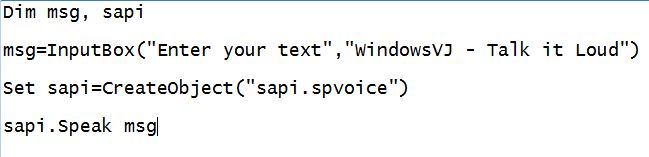
After saving this file double click the .vbs file and it will prompt you for a text.

Input the text & press OK to hear the inner voice of your Windows.
Leave a Reply